AZD: What's new
This page lists notable changes by release line, newest first. Each release line targets one IDE version; for example, AZD 2026.3 runs on IDEs 2026.3. For every release, see the version history on JetBrains Marketplace.
AZD 2026.3
IDE support
AZD 2026.3 runs only on JetBrains IDEs 2026.3 (build 263). Since 2026.3.8 it needs build 263.6259 or later. IDEs 2026.2 keep receiving AZD 2026.2 updates.
Boards and work items
AZD 2026.3.10 lets you change more of a work item without leaving the IDE:
Pick dates from a calendar in work item date fields. See Edit a work item.
Edit a work item's title in its details tab, and delete work items to the recycle bin.
Edit and delete your own comments in the work item timeline.
AZD 2026.3.9 added:
Long work item titles and descriptions wrap to the panel width.
Repro Steps, Acceptance Criteria and other rich-text fields show at the top of the work item. A new bug can have its Repro Steps filled in when you create it.
Attachments: manage a work item's attachments, and attach files and screenshots to comments.
A missing or invalid field value is highlighted on the field itself when you apply or create.
AZD 2026.3.8 shows custom work item fields, which you can edit or hide.
Fixes: @mentions and line breaks in comments work on Azure DevOps Server, resolving an edit conflict keeps fields someone else changed, text in angle brackets such as List<String> stays in comments, Delete Permanently on an attachment deletes the file, and the Wrap long text in work items setting applies to open work items right away. Images in descriptions load, and Markdown fields and Azure DevOps Server comments display formatted.
Pull requests
AZD 2026.3.9:
The pull request list shows open comment threads and when each pull request was last updated, and you can sort it by Last Updated.
New changes since review counts your votes and comments made anywhere, including the web.
AZD 2026.3.8 makes creating a pull request faster:
New pull requests open with the target and source branches filled in, even without a local default branch. Set preferred target branches for each project in Preferences.
Fill in titles from a template with work item placeholders, such as
EP-{workItemId} {workItemTitle}.The branch picker keeps your choice without clicking Save, and Create waits until the AI title or description is ready.
Fix: clearing the delete-branch option when you complete a pull request now keeps the branch.
AI
AZD 2026.3.8:
GitHub Copilot can be an AI provider, using your existing Copilot plan.
Claude Opus 5, Claude Sonnet 5 and GPT-5.6 can be selected, with GPT-5.6 Sol as the default OpenAI model. See Available models.
OpenAI-compatible server URLs ending in
/v1, such as LM Studio's, work again.
Security
Since AZD 2026.3.8, images in pull requests and work items no longer send your Azure DevOps credentials to other sites.
Pull request review
AZD 2026.3.6 makes the state of a pull request easier to read in the details panel:
Reviewer rows show rejected, waiting for author and approved with suggestions separately.
A reviewer who declined to review is shown as declined.
A pull request whose merge Azure DevOps is still evaluating says so.
A merge blocked by a branch policy is explained in the details panel.
The unresolved-comments row links to the comments.
The branch popup can open a pull request in a new Git worktree.
Fixes in this release: linking a work item reports failures, a newly opened pull request is no longer listed as unmergeable, and refreshing pull requests, pipelines or boards no longer crashes on recent 2026.3 builds.
AZD 2026.2
Awaiting My Vote filter: a quick filter in the pull request list shows pull requests assigned to you that you have not voted on yet.
Zoomable comment images: click an image in a pull request comment to open it in an editor tab.
Viewed state for deleted and moved files: deleted and moved files in a pull request can be marked as viewed.
Per-pipeline approval muting: mute approval notifications for one pipeline from the notification or from Pipeline Settings.
Richer run list: runs show their commit message, and run details show a colored status label. Runs on the default branch link to the pull request that triggered them.
Boards: open the Kanban board of any project in the organization, and filter work items by iteration, including
@CurrentIteration.Pipeline metrics: new Top Failure Causes and Slowest Stages widgets in AZD: Pipeline metrics and agent pools.
Default AI provider notice: a notification at startup explains that AI features use the built-in AZD cloud provider by default, with a link to the AI settings.
Optional task integration: AZD loads without the Issue Trackers plugin (formerly Task Management), which is no longer bundled with every IDE. Only the task server integration needs it.
Performance and reliability: watching a long-running build uses less memory, large test result lists sort and filter faster, opening Settings no longer freezes the IDE, and views that need the built-in browser explain why when it is not available. Completed pull requests show their changed, binary, renamed and deleted files.
AI models
AZD 2026.2.23 added newer OpenAI, Claude and Gemini models to the AI settings. Providers set to a retired Gemini model move to its successor. See AI providers.
Sign-in reliability
Since AZD 2026.2.21, Microsoft Entra ID and Azure CLI sign-in no longer stop working after about an hour. A sign-in error now offers a Log in again… button instead of needing an IDE restart.
AZD 2026.1
Sign in with Microsoft: OAuth sign-in with Microsoft Entra ID for Azure DevOps Services, from the tool windows, the clone dialog and Settings. See Sign in with Microsoft.
Sign in with Azure CLI: for organizations that block OAuth apps or phase out personal access tokens. See Sign in with Azure CLI.
AZD Boards tool window: find, edit and create work items across projects, and move cards on the Kanban board. See AZD: Boards and work items.
Metrics dashboards: pipeline and pull request metrics, queue time statistics, and an agent pool view with agent actions. See AZD: Pipeline metrics and agent pools.
Queue time: run details show how long a run waited for an agent.
Auto-refresh: separate settings for pipelines and pull requests.
Sort popups: the pull request and pipeline lists have a sort button.
Android Studio: the stage diagram and the metrics dashboards work in Android Studio.
Corporate proxies: AZD retries requests that a TLS-inspecting proxy interrupts instead of asking for a new token.
Built-in AI provider: the AZD provider uses GPT-5.4 mini and works without setup.
Pipeline approvals
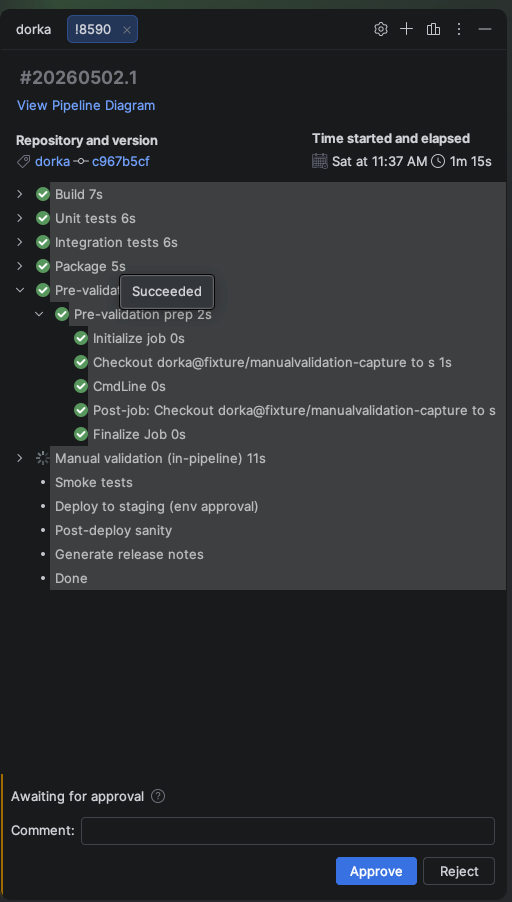
Approve, reject or defer environment approvals and ManualValidation@1 tasks from the run tab, and get notified when a run waits for you. See AZD: Approve pipeline runs.
Pipeline test results
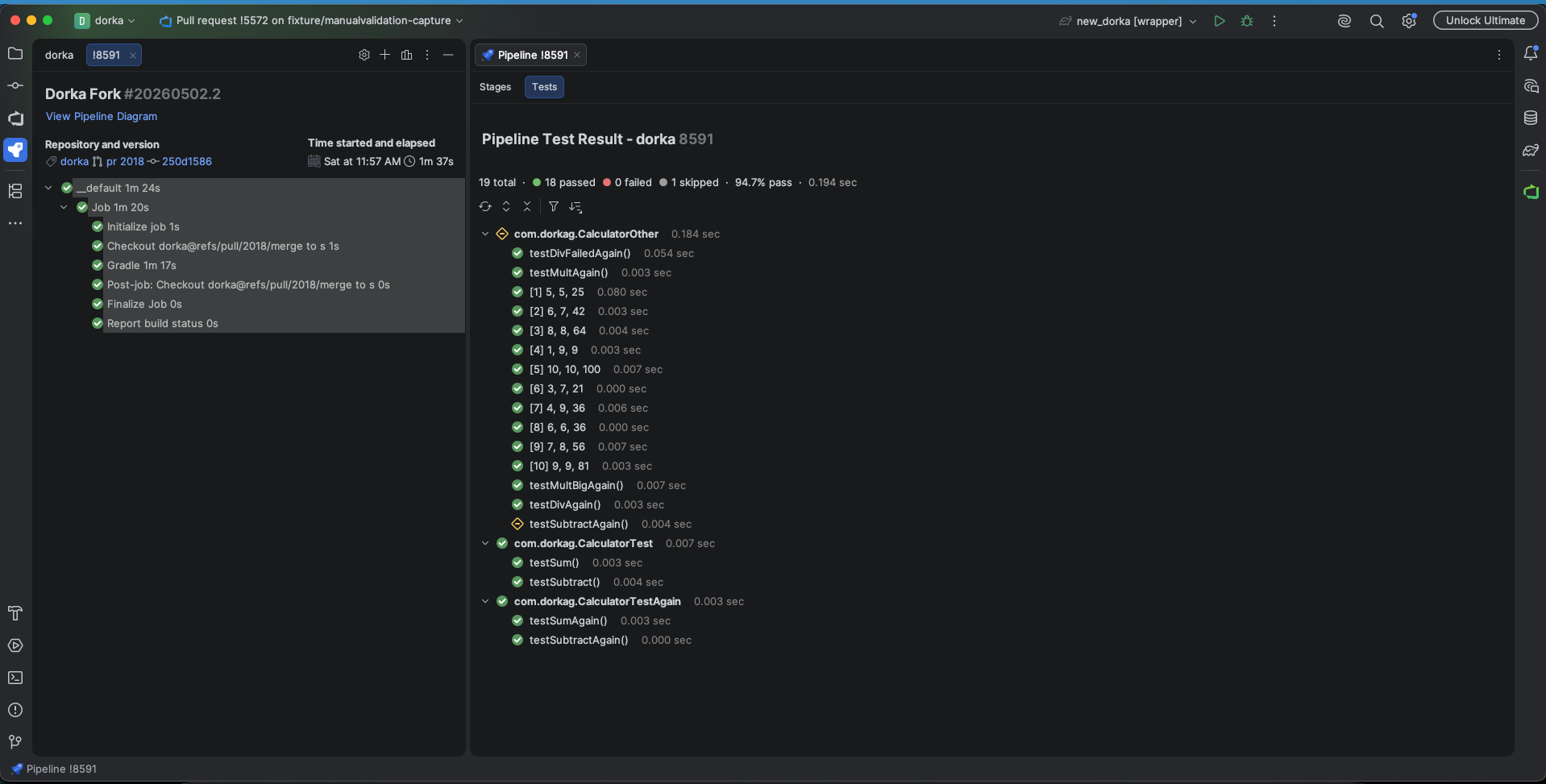
The Tests tab shows a summary of the run's tests and sorts them by name or duration. Associate automated tests with Azure DevOps test cases from the context menu. See AZD: Review pipeline test results.
AI log analysis
Stage logs open in the editor page by page. Chat with AI About This Log sends a log to an AI provider that explains the failure and answers follow-up questions. See Analyze a log with AI.
Pull request metrics
A dashboard shows pull request cycle time, throughput and review activity for the repository. See Pull request metrics.
Pull requests
A new pull request can take its description from the repository's pull request template.
Commit links in the timeline open the commit in the pull request details.
@mentions and!pull request references autocomplete in comments.A toggle shows or hides draft pull requests.
An expired build in the CI status popup can be queued again.
The AI review tour walks you through the changes.
AZD 2025.3
Releases from November 2025 to January 2026 added:
Azure Pipelines language server: completion, validation and hover help in pipeline YAML files. See AZD: Edit Azure Pipelines YAML.
MCP tools: AI chat can create work items, manage pull requests and trigger pipelines. See MCP tools.
Several work items per commit: select more than one work item for a commit message. See Add work items to a commit message.
Viewed files: the viewed state of pull request files syncs with Azure DevOps, and a progress line counts the viewed files. See Go through the changed files.
AZD 2025.2
Later AZD 2025.2 updates, from September to November 2025, added:
Shallow clone: clone a repository with a truncated history. See Clone an Azure DevOps repository.
Work items in commit messages: select work items when you generate a commit message. See Add work items to a commit message.
Stage diagram: new pipeline stage diagram features, and faster loading of runs and run details. See View the stage diagram.