JirAI: What's new
This page lists the user-visible changes in each JirAI release, newest first.
The full change log is on the JetBrains Marketplace versions page.
2026.3.23
Open a card's work item in the IDE from the board with a double-click, Enter or Open. See Open a card's work item in the IDE.
When you drag or reorder a card, the board no longer offers positions next to sub-tasks that Jira cannot keep, and a card dragged to another column lands where Jira places it.
Every person filter and picker lists you first, under Unassigned, and opens on the current value.
Editing a comment or the description shows Cancel and a highlighted Save on the right.
2026.3.22
The Breakdown tab has a filter bar (search, status, type, priority, assignee, reporter, unresolved and sort) and Show Hierarchy with Expand All and Collapse All. See Filter the breakdown.
Copy Issue URL is in every issue menu. The Timeline and details menus also gain Open in Jira and Copy Issue Key.
Work item types that cannot have child work items open with only the Timeline tab.
2026.3.21
JirAI is free: no licence, trial or subscription is needed to install and use it. See JirAI: Install.
2026.3.20
Edit your comments from the issue Timeline. Text and formatting are editable; mentions, images, tables and anything else the editor cannot show stay as locked pieces and are kept exactly as they are. Restricted and service-desk comments still open in Jira. See Edit a comment.
2026.3.19
The Summary tab of a space matches Jira's Summary: four tiles (completed, updated and created in the range, and due soon in the next 7 days) and six widgets, each of which can show its table. Hide a widget from its menu and bring it back from Hidden widgets. See Summary tab.
New space filters: Status, Priority, Parent, Created, Updated and Due date on Summary and Reports; Summary also offers Sprint, Fix version, Component and Label. Throughput, Created vs completed and Work in progress by age are on Reports.
Drag a card to another column or to a new place in its column. Jira's transition chooser and screens appear as they do from the card menu. See Move a card.
Create Branch from an issue opens the IDE's New Branch dialog with a name such as
PFX-42-fix-login-timeout, then offers to move the issue to In Progress. See Create a branch from an issue and Development settings.The status bar shows the issue of your current Git branch, with Open Current Jira Issue. See The current issue in the status bar.
With changelists on, an empty commit message starts with the current issue's key. Drafts and Git commit templates are never overwritten. See The issue key in commit messages.
2026.3.18
The Lead time and Cycle time tiles moved off the Summary tab; both are on Reports.
The agent tools tell your AI assistant to check with JirAI before it creates an issue, and a failed check says what to do next. See When a tool call fails.
2026.3.17
Push to Jira is available from a right-click on a Markdown file in the Project view. It is not offered under Remote Development. See Open the Push to Jira dialog.
Deleting an attachment warns you when the attachment is shown inline in a comment.
2026.3.16
The Board tab of a space shows a company-managed Kanban board, or the active sprint of a Scrum board, with columns, cards, WIP limits, quick filters and an Assignee filter.
JirAI remembers the board you picked for each space.
Move a card to another column, or up and down within its column, from the card menu: the More button, a right-click or Shift+Enter.
When Jira needs fields for the transition, its transition screen opens.
The board works from the keyboard: Tab moves between columns and the arrow keys move between cards.
A screen reader announces each card and column.
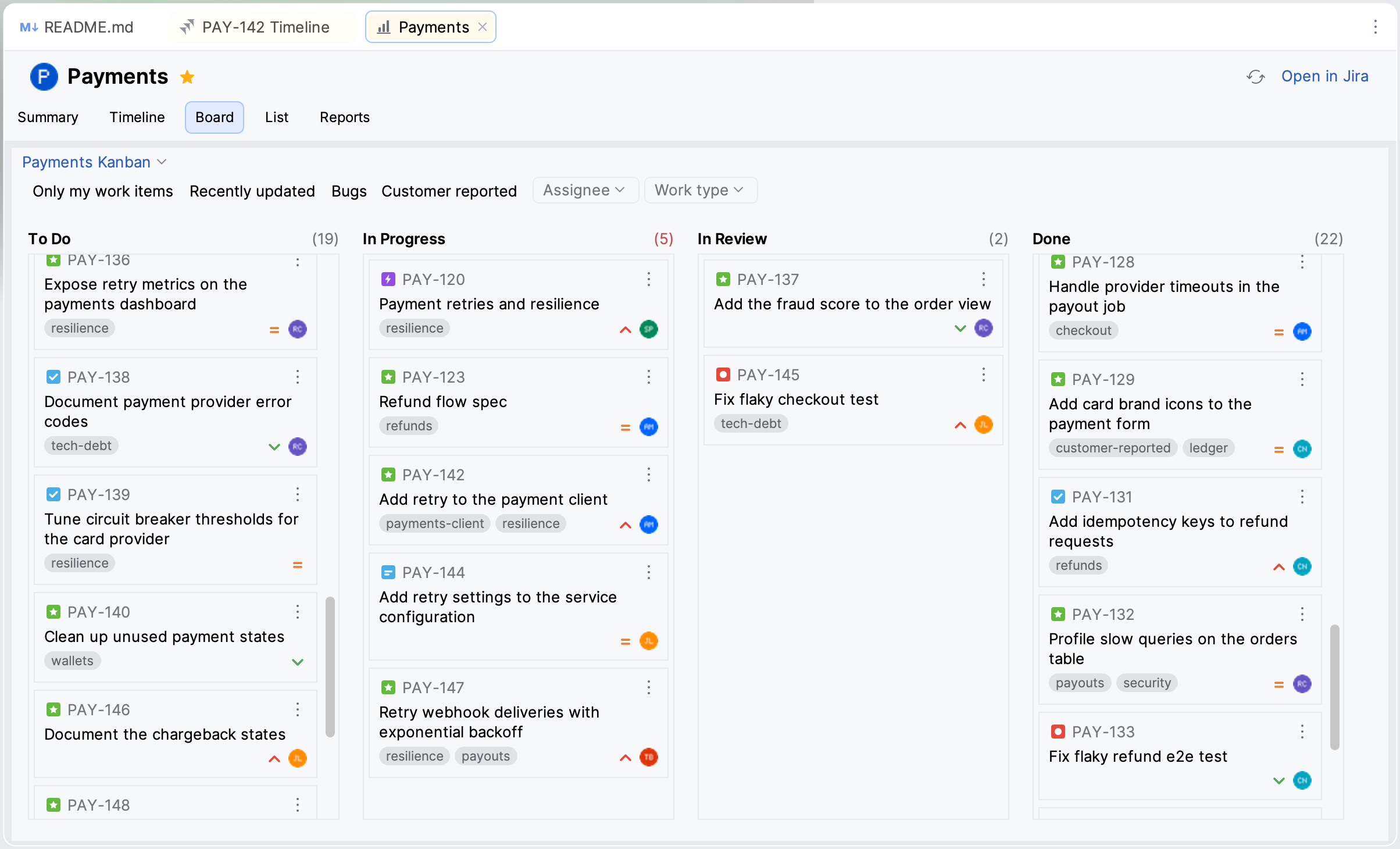
See Board.
2026.3.15
A house standard tells JirAI what your team expects on an issue beyond Jira's required fields: fields that must be set, headings the description must have and patterns a value must match.
An AI assistant that validates a draft is told when the draft misses one of these rules.
A one-time notification points you to the IDE's MCP server setting when the server is off, so that the JirAI agent tools become visible to your assistant.
Open ↗ beside the Parent field opens the parent work item, and the Breakdown tab links to the parent.
Add child flags issue types that cannot sit under the parent, picks the type when only one fits and tells you when you cannot create in the parent's project.
Fixes for the Breakdown list and the List tab of a space: the list keeps its position and selection when you fold, edit or refresh.
2026.3.14
The Breakdown section in the issue details and the Breakdown tab beside the issue timeline list an issue's child work items, with Add child.
The List tab of a space shows work items under their parent as a foldable tree, with Show Hierarchy, Expand All and Collapse All.
Right-click the issue details and choose Hide Fields… to hide several custom fields at once.
The Type row in the issue details shows the issue type icon.
The Push to Jira dialog shows its warnings box only when there are warnings.
2026.3.12 and 2026.3.13
The Project and Issue type pickers on the Create form show project avatars and issue type icons.
Agent tools: an AI coding assistant connected to the IDE's MCP server can ask JirAI for a Jira project's real create screen and check a drafted issue against it before filing it.
2026.3.13 is a maintenance release with no visible changes.
2026.3.11
Sign in and sign out from , in addition to the tool window.
The Sprint filter of space reports lists all sprints when a space has several boards.
2026.3.5 to 2026.3.10
2026.3.10: hide a custom field from the eye icon on its row, and manage hidden fields in .
2026.3.9: Markdown in the Create form description, Push to Jira for Markdown documents, document presets for Superpowers and spec-kit, and the List tab of a space.
2026.3.8: a space downloads once for all its tabs.
2026.3.7: exclude a filter value with a second click or Shift+click, All and Clear in every filter popup, and several people in the Assignee and Reporter filters.
2026.3.6: filter space reports by sprint, sprint status, fix version, component and label.
2026.3.5: space pages with the Summary and Reports tabs, and the large-space setting in .
2026.3.1 to 2026.3.4
The first releases brought the core of JirAI:
The JirAI tool window with quick filters, filter chips, search and sorting.
A Create form built from your project's own create screen.
Issue details with in-place editing, workflow transitions, attachments and issue links.
The issue timeline with comments,
@mentionsand description editing.Support for Remote Development, corporate HTTP proxies and the IDE credential store.